

Introduction: Why Lighting Matters in DIY Craft Photography
If you’re passionate about DIY, crafts, or creative living, you know the satisfaction that comes from completing a handmade project. But capturing your creations in photographs that do them justice? That’s a whole different art. Whether you’re documenting projects for your portfolio, social media, or an online shop, the right craft studio lighting makes the difference between lackluster snapshots and professional-quality images that pop. Even the most vibrant, intricate crafts can appear dull or distorted if lighting isn’t carefully planned. Thankfully, you don’t need a commercial photo studio—just a thoughtful approach to lighting in your existing DIY craft space.
This in-depth guide will walk you through creating a photography-ready lighting setup in your craft studio. We’ll cover essential equipment, layout strategies, lighting types, best practices for shooting various materials, and how to troubleshoot common issues. Whether you’re using a smartphone or a DSLR, you’ll learn how to showcase your crafts with clarity, color accuracy, and depth. Ready to transform your craft photos? Let’s illuminate the process.
Understanding Light: The Basics for Crafters
Types of Light Sources
Before you rearrange lamps or buy new bulbs, it’s crucial to know what types of lighting work best for craft photography:
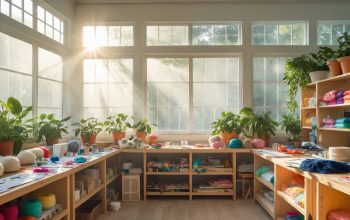
- Natural Light: Sunlight streaming through a window provides soft, diffused light that flatters most crafts. It’s free and easy, but changes throughout the day and with the weather.
- Artificial Light: Includes LED panels, desk lamps, ring lights, and softboxes. Artificial light offers consistency and control regardless of time or season.
- Ambient Light: The general fill light in your studio, such as overhead fixtures. Not always ideal for photos, but can supplement other sources.
Light Quality: Hard vs. Soft
Soft light is diffused and minimizes shadows, resulting in even, professional-looking images. Hard light creates sharp shadows and can highlight texture, but often exaggerates flaws or creates unwanted reflections. For most crafts—especially those with glossy, detailed, or colorful surfaces—soft, even lighting is ideal.
Essential Lighting Equipment for Craft Studio Photography
Must-Have Gear
- Adjustable LED Panels: Offer bright, consistent light with adjustable color temperature. Choose models with high CRI (color rendering index) for true-to-life colors.
- Softboxes or Diffusers: Soften and spread light, reducing harsh shadows and reflections. Collapsible models save space in small studios.
- Ring Lights: Excellent for small crafts, jewelry, and close-ups. Evenly illuminate the subject with minimal shadowing.
- Reflectors: Bounce light back onto your project, filling in shadows and creating a balanced look. DIY options include white foam boards or poster board.
- Tripod: Keeps your camera or phone steady for crisp, clear images. Look for a flexible tripod for tabletop use.
Optional Upgrades
- Light Stands: Allow precise positioning of lights around your workspace.
- Backdrop Stands: Hold seamless paper or fabric backgrounds for clean, distraction-free images.
- Remote Shutter Release: Prevents camera shake when taking photos, especially in low light.
Setting Up Your DIY Studio Lighting for Photography
Choosing the Right Space
Pick a spot in your studio with ample room for both your craft and lighting setup. Ideally, position your shooting table near a window for natural daylight, but ensure there’s space for artificial lights when needed. Clear clutter and use neutral or white backdrops to keep the focus on your project.
Lighting Layout: The Three-Point System
For consistent, professional results, use a modified three-point lighting setup:
- Main (Key) Light: Your brightest source, placed at a 45-degree angle to your project. Use an LED panel or softbox.
- Fill Light: Placed opposite the key light, at a lower intensity. Fills in shadows. A smaller lamp, ring light, or reflector works well.
- Back Light (Accent or Hair Light): Positioned behind and above your craft to separate it from the background and add dimension. Optional for flat crafts, but great for 3D work.
Adjust the distance and angle of each light to achieve the softest, most flattering effect for your specific project.
Diffusing and Modifying Light
Harsh lighting can blow out highlights and wash out details. Always diffuse artificial lights with softboxes, umbrellas, or DIY options like white shower curtains or tracing paper. For natural light, hang sheer curtains or shoot on overcast days for naturally diffused sunlight.
Lighting Strategies for Different Types of Crafts
Textiles & Quilts
Textile crafts benefit from angled lighting that reveals texture without harsh shadows. Use a pair of softboxes or large diffused LED panels at 45-degree angles. For large quilts, consider shooting on the floor with lights elevated above, or use a wall-mounted system.
Jewelry & Small Objects
Small, shiny items require careful light control to avoid glare. Use a light tent or DIY box lined with white paper to diffuse light on all sides. Position ring lights or small LED panels evenly, and experiment with reflector placement to highlight detail without creating hotspots.
Paper Crafts & Scrapbooking
Paper projects are prone to casting shadows and showing finger marks. Use soft, overhead lighting and a large reflector in front to bounce light back. Ensure your hands and tools are clean to avoid smudges visible in high-res images.
Mixed Media & 3D Projects
For sculptures, ceramics, and layered crafts, use three-point lighting to emphasize depth. A backlight helps separate the object from the background and highlights contours. Adjust each light’s intensity to avoid flattening the subject.
Camera and Lighting Settings: Getting It Right
White Balance
Set your camera or smartphone’s white balance to match your lighting (daylight, tungsten, custom) for accurate colors. If you’re unsure, shoot in RAW format and correct white balance during editing.
ISO, Aperture, and Shutter Speed
- ISO: Keep ISO as low as possible (100–400) to avoid grainy images.
- Aperture: Use a moderate aperture (f/5.6–f/11) for maximum sharpness and depth of field.
- Shutter Speed: Use a tripod for slower shutter speeds that let in more light without blur.
Smartphones often have ‘pro’ or ‘manual’ modes that allow adjustment of these settings. Use them when possible for the best results.
Lighting Troubleshooting: Common Problems & Solutions
Shadows
If you notice deep or distracting shadows, add a fill light or reposition your reflectors. Avoid placing lights directly above the project, which can cast unsightly shadows.
Glare and Reflections
Reduce glare by diffusing light, changing the angle of your lights, or using polarizing filters. For glossy items, experiment with indirect lighting—bounce light off a white wall or ceiling.
Color Casts
Mixed lighting (e.g., daylight and warm bulbs) can create strange color casts. Use bulbs with the same color temperature, and turn off other ambient lights when photographing crafts.
Uneven Lighting
If one side of your project is brighter, adjust your fill light or add a reflector. Check your lighting angles and move lights closer or farther as needed for a balanced look.
DIY Lighting Hacks for Crafters on a Budget
- Foam Board Reflectors: White foam board is inexpensive and perfect for bouncing light. Use multiple boards to fill in shadows.
- Homemade Light Tent: Make a small light box with a cardboard box, white tissue paper, and poster board. Great for shooting jewelry and miniatures.
- DIY Diffusers: Tracing paper, shower curtains, or even pillowcases can soften harsh light from lamps or LEDs.
- Clamp Lamps: Inexpensive hardware store clamp lamps fitted with daylight LED bulbs are flexible and effective for small setups.
Maintaining and Upgrading Your Studio Lighting
Routine Maintenance
- Clean bulbs and diffusers regularly to prevent dust from affecting light quality.
- Check for loose connections or flickering bulbs and replace promptly.
- Organize cables and power strips to prevent tripping hazards and potential damage.
When to Upgrade
- If your colors are consistently off, invest in higher CRI LEDs.
- Upgrade to adjustable color temperature panels to match daylight or experiment with creative effects.
- Consider a larger softbox or ring light if you expand to bigger crafts or want more even lighting.
Showcasing Your Work: Editing and Sharing
Basic Editing Tips
- Crop out distractions and adjust exposure, contrast, and white balance as needed.
- Sharpen images slightly to emphasize detail, but avoid over-editing.
- Use free or low-cost editing apps like Snapseed, Lightroom Mobile, or Canva.
Preparing Images for Web and Print
- Export images in high resolution for print, and optimized, compressed formats for web or social sharing.
- Add subtle watermarks if desired, but keep the focus on your craft.
- Maintain a consistent style across your portfolio to strengthen your brand identity.
Conclusion: Lighting as a Creative Tool in Your Craft Studio
Good lighting is more than a technical requirement—it’s a creative tool that empowers you to share your crafts with the world in their best light. By understanding and controlling the illumination in your DIY craft studio, you elevate not just your photos, but your entire creative process. Thoughtful lighting highlights color, texture, and detail, making your work irresistible to potential customers, collaborators, and fellow crafters.
As you experiment with different setups, don’t be afraid to tweak, adjust, and play with your lighting. Every craft has its unique challenges and opportunities, and your lighting should evolve alongside your skills and creative ambitions. Start with the basics outlined here, upgrade equipment as your needs grow, and always remember—great photos start with great light. Your projects deserve to shine, both in your studio and on the screens and pages where you share them. Happy crafting, and happy shooting!
I usually just use the overhead light in my craft room for photos, but my colors look off. Is it better to turn off ambient lights and rely fully on a dedicated light source, or should I combine both? Any troubleshooting advice?
For accurate colors in your photos, it’s best to turn off overhead or ambient lights and use a dedicated light source designed for photography. Mixing light sources can cause unwanted color casts due to different color temperatures. Position your dedicated light to evenly illuminate your craft and adjust your camera’s white balance setting for even better results.
If I only have a small window in my craft room and the natural light changes a lot throughout the day, would you recommend sticking with artificial lights or trying to work with the available sunlight?
Since your window is small and the sunlight varies, relying solely on natural light might lead to inconsistent results in your photos. Using artificial lights will give you more control and consistency, regardless of the time of day or weather. You can still use natural light when it’s good, but having artificial lighting as your main source is a smart choice for dependable results.
When shooting crafts with metallic or glossy finishes, what lighting setup would you recommend to minimize glare while still getting accurate colors and details?
To minimize glare on metallic or glossy crafts, try using diffused lighting, such as softboxes or light tents, positioned at a 45-degree angle to the subject rather than head-on. This helps reduce reflections while maintaining even illumination. Using daylight-balanced bulbs also helps ensure your colors stay accurate and true to life.
I’m just starting out and working with a tight budget—are there any specific types of desk lamps or bulbs you’d suggest as affordable alternatives to professional softboxes for small craft spaces?
For a budget-friendly setup, LED desk lamps with adjustable arms work well because you can direct the light where you need it. Pair these with daylight-balanced bulbs (around 5000–6500K) for more natural color. To diffuse harsh light, you can clip white parchment paper or a thin white cloth over the lamp, creating a softer effect similar to a softbox.
How much time does it realistically take to set up and tweak a basic lighting layout for a typical at-home craft photography session?
For a typical at-home craft photography session, expect to spend about 15 to 30 minutes setting up and adjusting a basic lighting layout. This includes arranging lights, testing angles, and making minor tweaks to eliminate unwanted shadows or glare. As you get more familiar with your setup, the process usually gets quicker.
Could you expand on troubleshooting common lighting issues? For example, what’s the best way to fix harsh shadows when photographing shiny or metallic crafts?
To reduce harsh shadows when photographing shiny or metallic crafts, try diffusing your light sources with materials like a white sheet or a softbox. Position your lights at different angles to minimize direct reflections. You can also use reflectors—like white foam boards—to bounce light into shadowed areas, creating a softer, more even illumination.
When photographing materials with a lot of shine or texture, do you recommend any specific lighting tricks to avoid glare or overly harsh shadows?
For shiny or textured materials, diffusing your light is key. Try using a softbox, or place a white sheet or translucent paper between your light source and the subject. Position your lights at a slight angle rather than straight on to reduce glare, and use reflectors to fill in shadows gently.
I’m working on photographing crafts made of reflective materials like glass and metal. Do you have any tips or adjustments for lighting these kinds of projects based on your guide?
Photographing reflective materials like glass and metal can be tricky, but here are some adjustments you can make: Diffuse your lighting as much as possible using softboxes or sheer fabric to reduce harsh reflections. Position your lights at angles to the side or above, rather than head-on, to avoid glare. You can also use white foam boards to bounce light and fill in shadows gently.
If my craft space only gets good natural light during certain hours, do you have suggestions for scheduling photo sessions or balancing artificial light so my colors still look true?
To get the best color accuracy, try to schedule your photo sessions during those hours when natural light is at its peak in your space. If that’s not always possible, use daylight-balanced artificial lights, like LED panels with a color temperature around 5500K. Mixing these with available natural light can help keep your colors true and consistent.