
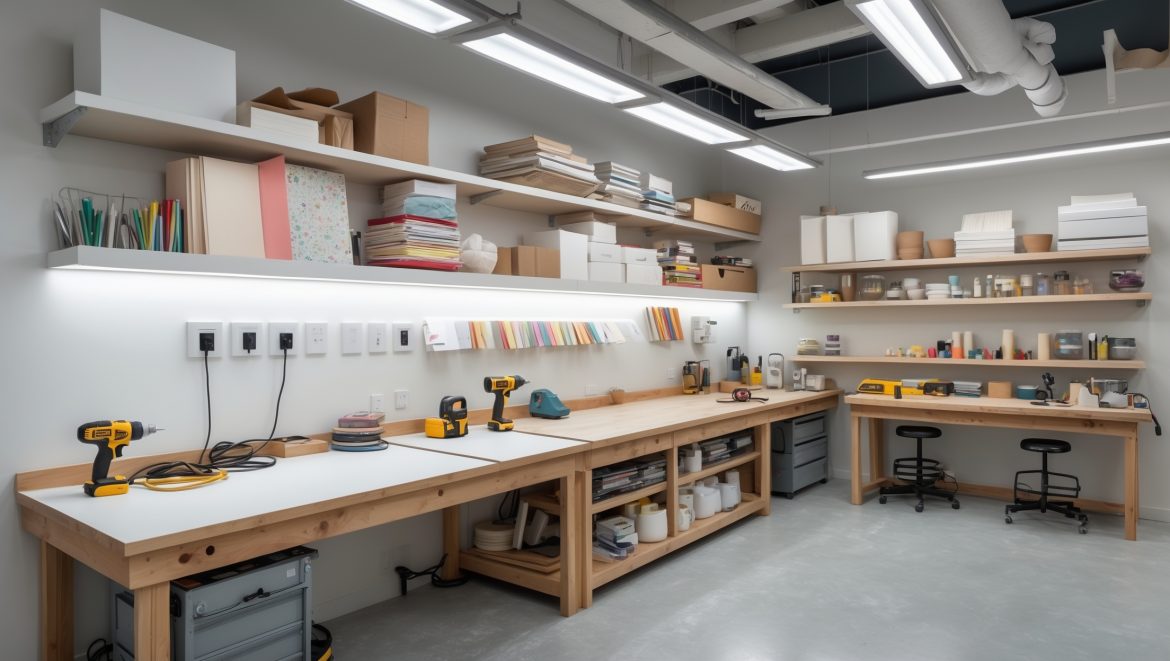
Introduction: Powering Creative Spaces Safely and Efficiently
In the world of DIY, crafts, and creative living, your studio’s electrical setup is more than just a background detail—it’s the lifeblood of productivity and safety. Whether you’re soldering jewelry, running multiple glue guns, operating a laser cutter, or simply need reliable lighting for intricate work, the quality of your wiring, outlets, and power management can make or break your creative flow. Yet, for many makers, electrical planning is an afterthought—until tripped breakers, tangled cords, or worse, safety hazards, interrupt the making magic.
This in-depth guide is designed specifically for DIYers and craft enthusiasts looking to create (or upgrade) a studio that’s not only functional, but safe and future-proof. We’ll demystify the essentials of wiring, outlet selection, surge protection, and power management—empowering you to avoid common mistakes, comply with electrical codes, and ensure your studio supports your creativity for years to come. Whether you rent a corner of a spare room or are building out a dedicated workshop, this guide delivers practical, actionable steps to get your electrical setup right.
Understanding Your Craft Studio’s Electrical Needs
Inventory Your Tools, Equipment, and Power Draw
Before modifying or designing your electrical system, make a detailed list of every tool, appliance, and device you use or plan to use. Note each item’s wattage (found on labels or manuals) and voltage requirements. Don’t forget lighting, computers or tablets, air filtration units, and chargers for cordless tools.
- High-draw tools: Heat presses, space heaters, air compressors, laser cutters, sewing machines
- Medium-draw tools: Hot glue guns, soldering irons, Dremels, irons
- Low-draw items: LED lamps, phone chargers, laptops
Add up the wattage totals for each “work zone” (e.g., cutting station, electronics bench) to gauge how many amps your circuits must safely support.
Evaluate Your Current Electrical System
Check your studio’s outlets, circuit breakers, and wiring age. Are outlets grounded? Do you have GFCI (ground fault circuit interrupter) protection where moisture is possible (e.g., near sinks)? Is your breaker panel modern enough to handle additional load? If your space is older, consult a licensed electrician for a safety assessment before making upgrades.
Designing Your Studio’s Electrical Layout
Plan for Flexibility and Growth
Over time, your tool collection and creative ambitions will grow. It’s wise to “overbuild” your electrical infrastructure, adding more outlets and capacity than you currently need. Factor in future equipment, mobile workstations, and possible layout changes.
Optimal Outlet Placement
- Workbenches: Install double duplex outlets (four plugs) every 4–6 feet along benches for easy tool access.
- Wall Height: Place outlets 42–48 inches above the floor—higher than standard—to keep cords off the ground and accessible above work surfaces.
- Mobile Projects: Consider floor outlets with protective covers for large tables or island workstations.
- Specialty Power: Dedicated 20-amp outlets for high-draw tools reduce tripping hazards and overloads.
- USB Outlets: Modern combination outlets with integrated USB ports keep device chargers tidy.
Lighting and Task Power
Good lighting is non-negotiable. Install switched ceiling outlets for overhead fixtures, and consider track lighting for flexibility. Add task lights with separate circuits so a tripped breaker won’t leave you in the dark during detailed work.
Safe Wiring: Materials, Methods, and Compliance
Choosing the Right Wire Gauge and Type
- 15-amp circuits: Use 14-gauge wire (for light-duty, low-draw zones).
- 20-amp circuits: Use 12-gauge wire (for most outlets, especially with power tools).
- Dedicated circuits: For heat presses, compressors, or dust collectors, run separate 20-amp or higher circuits with proper wire (consult code for amperage).
Always use copper wire for durability and safety; aluminum wiring is less safe for DIY applications.
Surface-Mount vs. In-Wall Wiring
For existing finished spaces, surface-mount raceways (rigid plastic or metal trunking) allow you to add outlets without opening walls. They’re code-compliant, neat, and flexible for future changes. In new builds or major renovations, concealed (in-wall) wiring offers a cleaner look but must be installed to code, usually by a licensed electrician.
Electrical Code Considerations
- All wiring and outlets must comply with the National Electrical Code (NEC) and local codes.
- GFCI protection is required for any outlet near water sources or in potentially damp locations.
- Arc-fault circuit interrupters (AFCI) may be required in finished studios to prevent electrical fires.
- All outlets must be properly grounded.
- Permits are often required for new circuits or major upgrades—check your local rules.
Power Management: Outlets, Strips, and Load Balancing
Surge Protection: Guarding Your Gear
Many craft tools and electronics are sensitive to power surges. Avoid plugging expensive or irreplaceable devices directly into the wall. Use high-quality surge-protecting power strips (look for UL 1449 certification) and replace them every 3–5 years. For whole-room protection, consider a panel-mounted surge suppressor installed by an electrician.
Extension Cords: Best Practices
- Use only heavy-duty, grounded extension cords (minimum 14-gauge for most studio tools).
- Never “daisy-chain” extension cords or overload strips.
- Keep cords as short as possible and route away from walkways to prevent tripping.
- Label cords for dedicated tools (e.g., “Laser Cutter Only”).
Cord Management Solutions
Messy cords aren’t just unsightly—they’re a safety risk. Use cable trays under benches, adhesive cord clips, or retractable cord reels. Bundle excess cord length with Velcro straps and keep powered tools unplugged when not in use to reduce fire risk.
Load Balancing and Circuit Labeling
Map out which outlets and tools are powered by each circuit breaker. Use a label maker or color-coded tape at the panel and each outlet. Avoid running multiple high-draw tools (like a heat press and space heater) on the same circuit. If breakers trip regularly, that’s a warning sign—redistribute your load or add more circuits.
Studio Power Upgrades: When to Call a Professional
Signs Your Studio Needs an Electrical Upgrade
- Frequent breaker trips or dimming lights when tools start up
- Older, ungrounded two-prong outlets
- Visible signs of wear (cracked outlets, warm faceplates, buzzing sounds)
- Plans to add high-draw equipment (kilns, CNC machines, air filtration systems)
Upgrading service panels, adding new circuits, or rewiring older spaces should always be handled by a licensed electrician. DIYers can add plug-in surge strips or cable management aids, but wiring changes are best left to professionals for safety and insurance compliance.
Consulting for Permit and Insurance Compliance
Major changes may require permits. Insurers may void coverage after a fire or accident if electrical work wasn’t to code. Always keep documentation of professional work for your records.
Practical Power Management Tips for Daily Studio Life
Routine Checks and Maintenance
- Test GFCI outlets monthly using their built-in buttons.
- Check power strips for frayed cords or scorch marks; replace if damaged.
- Vacuum or dust around outlets, power strips, and breaker panels regularly.
Energy Efficiency for Creative Spaces
- Switch to LED lighting for lower heat and energy costs.
- Use smart plugs or timers to power down tools and lights automatically.
- Unplug chargers and idle appliances when not in use.
Emergency Preparedness
- Keep a flashlight or battery lantern near the entrance in case of outages.
- Know how to quickly shut off your studio’s circuit breakers.
- Post emergency numbers (including your electrician!) by the main panel.
Case Study: Upgrading Power in a Multi-Zone Craft Studio
Challenge: A home-based maker with a 400-square-foot converted basement studio found she was routinely tripping breakers when running her space heater, laser cutter, and iron at once. The tangle of cords and lack of accessible outlets made setup and cleanup frustrating.
Solution: With an electrician’s help, she upgraded her panel, added two new 20-amp circuits, and installed a mix of high-mounted outlets and dedicated power strips for each work zone. GFCI outlets were added near the utility sink, and a cable tray system corralled cords. She now labels each outlet and circuit, and uses smart plugs to automate lighting and ventilation.
Results: No more tripped breakers, a dramatically safer workspace, and far less time wasted untangling cords—plus peace of mind that her costly equipment is protected.
Conclusion: Powering Your Passion Safely
Your creative studio should energize your ideas—not limit them with electrical headaches or safety hazards. By planning your wiring and outlets thoughtfully, using quality components, and respecting the limits of your circuits, you’ll set the stage for years of productive, safe, and inspiring making. Remember: while many aspects of DIY are hands-on, electrical work comes with real risk. Don’t hesitate to consult a professional for anything beyond basic plug-and-play upgrades.
Not only will a robust electrical setup make your space more comfortable and efficient—it can also future-proof your studio against the demands of new tools, larger projects, or even a growing creative business. You’ll spend less time worrying about tripped breakers or blown fuses, and more time doing what you love. Invest in your studio’s infrastructure now, and you’ll enjoy safer, smoother, and more sustainable creative sessions for years to come. Your future self—and your projects—will thank you!


When planning out my craft studio, how do I determine if I actually need a dedicated circuit for high-draw equipment like a heat press or laser cutter, or can I safely use an existing circuit if I rarely run them at the same time?
To decide if you need a dedicated circuit, first check the equipment’s wattage or amperage and compare it to your existing circuit’s capacity—usually 15 or 20 amps. Even if you rarely use the machines together, running just one could approach the circuit’s limit. For safety and reliability, a dedicated circuit is often best for high-draw tools, even if used separately.
For someone renting a small space and unable to make permanent electrical changes, what safe solutions do you recommend for managing multiple devices and minimizing tangled cords?
If you can’t make permanent changes, consider using heavy-duty power strips or surge protectors with built-in cord management. Velcro ties or cable sleeves help keep cords organized and untangled. Mounting strips or adhesive cable clips along walls or desks can guide cables neatly without damaging surfaces, making your setup safer and tidier.
If tripped breakers are already an issue in my workshop, what’s the first step you recommend before adding any more devices or rewiring?
Before adding any more devices or considering rewiring, check how much electrical load your workshop’s current circuits are handling. Make a list of your existing tools and their power ratings, and compare this to the circuit’s capacity. This helps identify if overloading is causing the breaker trips and whether you need to redistribute devices or upgrade your electrical system.
I’m trying to figure out how many outlets I need for my studio. If I have a mix of high-draw and low-draw tools in the same area, should I split them onto different circuits to avoid tripping breakers?
It’s a good idea to split high-draw and low-draw tools onto separate circuits. High-draw tools, like saws or kilns, can quickly overload a circuit if paired with other devices. Placing them on their own dedicated circuits helps prevent tripped breakers and keeps your workspace safer and more reliable. For your outlets, plan for more than you think you’ll need—this reduces the need for extension cords.
Can you clarify how to calculate the actual amp load for each work zone if the equipment labels only list wattage? Should I be concerned if my total wattage for a zone is close to the circuit’s maximum rating?
To calculate amp load, divide each equipment’s wattage by the circuit voltage (usually 120V in North America). For example, a 600-watt tool on a 120V circuit draws 5 amps. If your total wattage is close to the circuit’s maximum (e.g., 1800 watts on a 15A circuit), it’s best to keep usage below 80% of the max rating to avoid tripping breakers or overheating.
You mention avoiding common mistakes with wiring and outlets. What are the most frequent electrical code violations DIYers make when upgrading a craft studio, especially in older homes that might have outdated systems?
Some frequent code violations include overloading circuits, using the wrong gauge wire for the amperage, not grounding outlets properly, and failing to use GFCI outlets where required (like near sinks). In older homes, DIYers often neglect to update two-prong outlets to grounded three-prong types or overlook necessary permits and inspections for new wiring.
Could you clarify how frequently I should check or update the wiring in my studio if I add new equipment every year or so? The article mentions future-proofing, and I want to avoid safety issues as things change.
If you add new equipment every year, it’s smart to check your studio’s wiring at least annually. Each time you install major new gear or increase your power load, inspect outlets, cables, and your breakers for signs of wear or overload. Consider a thorough professional review every 3–5 years, or sooner if you notice any issues like flickering lights or warm outlets.
When listing out all the tools and gadgets in my studio, how do I determine if I actually need to install more outlets, or if using high-quality power strips and surge protectors is enough?
To decide if you need more outlets, add up the total number of devices you use regularly and check if they can all be plugged in safely without overloading any single outlet or power strip. If you often daisy-chain power strips or struggle to find free outlets, it’s safer to install more outlets. Use power strips only for low-to-moderate loads, and always check the combined wattage to avoid overloading circuits.
If I’m renting and can’t upgrade the wiring, what are some effective ways to manage multiple medium-draw tools like soldering irons and glue guns without tripping breakers or overloading outlets?
If you can’t upgrade the wiring, try plugging only one medium-draw tool into a single outlet at a time, and avoid daisy-chaining power strips. Rotate tool use so they’re not all running simultaneously. Also, check each tool’s wattage and make sure their total doesn’t exceed your circuit’s capacity, which is usually listed on your breaker panel.
When you talk about calculating the combined wattage for each work zone, is it necessary to leave a buffer, or should I add up the exact wattages of my tools and base my electrical setup on that total?
It’s important to leave a buffer when calculating the combined wattage for each work zone. Don’t just add up the exact wattages of your tools—include at least 20-25% extra capacity. This helps prevent overload, allows for future expansion, and ensures your electrical system runs safely and reliably.
The article mentions calculating amps based on the total wattage in each work zone. Is there a good rule of thumb for how much headroom to leave so I don’t risk overloading a circuit when adding new equipment later?
It’s wise to aim for using no more than 80% of a circuit’s rated capacity to prevent overloading and allow for future additions. For example, on a 20-amp circuit, keep your total continuous load at or below 16 amps. This headroom helps ensure safety and reliable performance, especially if you plan to add more equipment later.
I’m renting my space and not allowed to make big changes to the wiring. Are there safe ways to manage higher power loads with portable solutions, or is upgrading the electrical system always necessary?
You can safely manage higher power loads in a rental by using heavy-duty extension cords, power strips with surge protection, and portable power stations, as long as you don’t exceed the outlet’s capacity. Always check the device ratings and avoid daisy-chaining strips. Upgrading the electrical system isn’t always necessary, but stay within the limits set by your landlord and local codes.
If I want to future-proof my craft studio, how much extra circuit capacity should I plan for beyond my current equipment list?
It’s smart to plan for growth. A good rule is to add about 25-50% more circuit capacity than your current equipment needs. This allows for new tools, extra lighting, or upgrades. If your equipment list requires two 20-amp circuits now, consider installing three or four to keep options open for the future.
If I’m setting up a craft studio in a rented apartment and can’t modify existing wiring, what are the safest ways to handle high-draw tools like a heat press or laser cutter? Should I avoid using certain tools on standard outlets?
In a rented apartment where you can’t alter wiring, it’s safest to use only tools that match the outlet’s voltage and amperage rating—typically 15 amps for most apartments. High-draw tools like heat presses or laser cutters may exceed this, risking tripped breakers or fire hazards. Avoid running multiple high-wattage tools at once, and consider using only those recommended for residential circuits. If you’re unsure, consult the tool’s manual or an electrician.
Is there a budget-friendly way to manage surge protection across multiple outlets in a small studio, or do I really need to invest in individual surge protectors for each work zone?
You don’t need to buy a surge protector for every single outlet. A more budget-friendly approach is to use a quality power strip with built-in surge protection for each main work zone. This way, you can protect multiple devices at once without overspending, while still ensuring your equipment is safe from power surges.
When inventorying equipment for power needs, how should I plan for future upgrades or new high-draw tools? Should I oversize my circuits from the start, or is that not recommended?
When planning your studio’s electrical setup, it’s smart to anticipate future equipment upgrades. Slightly oversizing your circuits or adding extra dedicated circuits can save hassle later, as long as you don’t go so large that safety codes or breaker compatibility are an issue. Always match wire gauge to potential load and consult an electrician if in doubt.
When making a list of tools and their wattages like you suggested, how do I handle older equipment where the labels are worn off or missing? Is there a safe way to estimate their power draw for planning circuits?
If older equipment has missing or unreadable labels, you can estimate their wattage by looking up the make and model online, if available. If that’s not possible, you can use a plug-in watt meter to measure actual power draw. When in doubt, estimate on the higher side based on similar modern tools to ensure your circuits are safely rated.