
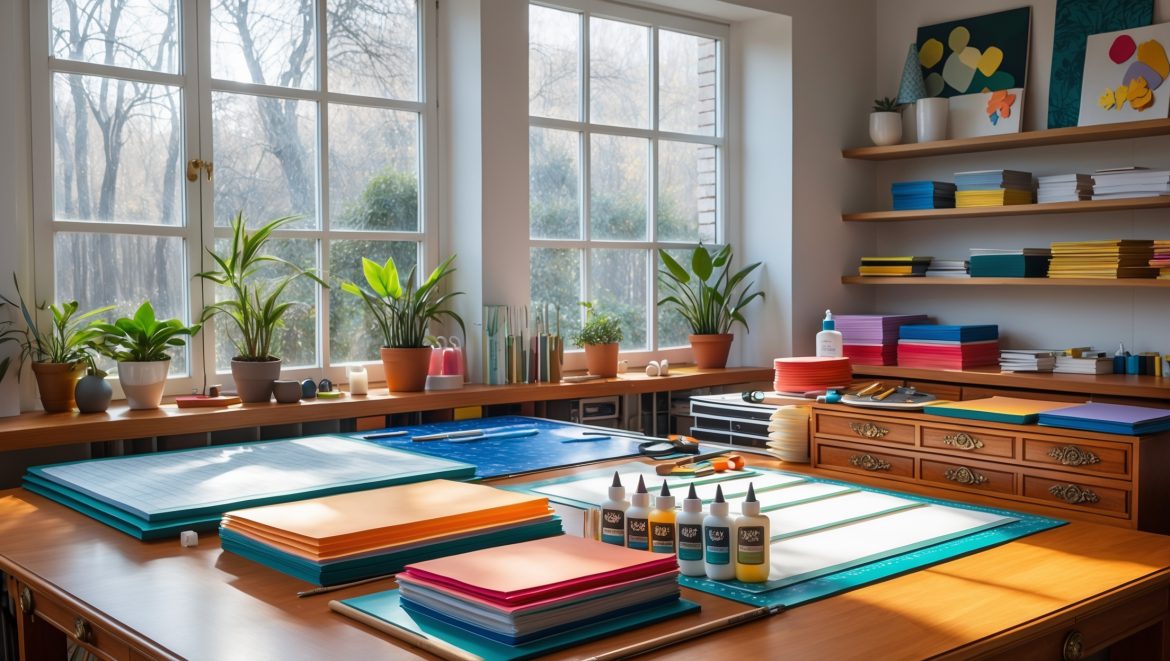
Introduction: Laying the Foundation for Papercraft Success
Embarking on your first DIY papercraft studio is an exciting leap into a world of limitless creative possibilities. Whether your passion is card making, origami, scrapbooking, or intricate papercut art, having a dedicated space can dramatically boost your productivity, enjoyment, and results. However, many beginners make avoidable mistakes that can lead to frustration, wasted materials, or even unsafe working conditions. This comprehensive guide will walk you through the most common pitfalls encountered by new papercraft enthusiasts, offering practical, actionable advice to ensure your studio is functional, inspiring, and a true catalyst for your creative journey. We’ll cover everything from space planning and essential tools to organization strategies, material selection, workflow optimization, and safety considerations. By learning from the missteps of others, you’ll save time, money, and headaches—setting yourself up for papercraft success from day one.
Choosing the Right Space: Size, Light, and Accessibility
Underestimating Space Requirements
One of the most common mistakes is picking a workspace that’s simply too small. Papercrafting, especially when working with 12×12″ cardstock, large cutting mats, or die-cutting machines, quickly fills up available surfaces. Crowded tables lead to lost tools, damaged projects, and frustration. Start by measuring the footprint of your essential tools and allow at least 50% extra space for spreading out materials, drying finished pieces, and safely maneuvering sharp implements.
Ignoring Natural and Task Lighting
Many beginners set up in dimly lit corners or rely solely on overhead fixtures. Poor lighting can cause eye strain, inaccurate cuts, and color-matching issues. Opt for a spot with abundant natural daylight, such as a room with a large window facing north or east. Supplement with adjustable task lamps that offer bright, color-accurate (5000K-6500K) LED bulbs positioned to minimize shadows on your workspace.
Overlooking Accessibility and Comfort
Don’t tuck your papercraft studio into a hard-to-reach attic or cramped basement. The easier it is to access, the more likely you’ll use it regularly. Ensure your chair and table are at ergonomic heights—your elbows should rest comfortably on the work surface, and your feet flat on the floor. Consider proximity to electrical outlets for tools and good ventilation, especially if you use adhesives or sprays.
Essential Tools and Equipment: Avoiding Costly Overbuying
Buying Every Gadget Upfront
It’s tempting to splurge on every trimmer, punch, and specialty tool you see online. But overbuying leads to clutter and wasted money. Instead, start with the basics:
- Self-healing cutting mat (at least 12×18 inches)
- Sharp craft knife and spare blades
- Precision scissors
- Steel ruler with non-slip backing
- Bone folder or scoring tool
- Quality adhesive (acid-free glue, double-sided tape)
- Pencil and eraser
- Basic selection of papers (various weights and colors)
As your skills and interests grow, you can add specialty tools like die-cut machines, embossers, or advanced punches.
Skipping Tool Maintenance
Neglecting regular maintenance shortens tool lifespan and can lead to poor results. Keep blades sharp, clean scissors after cutting adhesives, and replace cutting mats when grooves become deep. Store your tools carefully to avoid nicks and damage.
Overlooking Safety Gear
Sharp implements and adhesives are standard in papercrafting. Always have a first aid kit nearby, use a cutting mat, and wear safety glasses if using power tools or sprays. Never leave blades uncovered or within reach of children or pets.
Material Selection: Avoiding Quality and Compatibility Issues
Choosing the Wrong Paper
Not all paper is created equal. Using printer paper for heavy folding or intricate cuts leads to tearing and frustration. Start with a variety of paper weights:
- 65-80 lb (176-216 gsm) cardstock for sturdy bases
- Text-weight (60-70 gsm) for origami and delicate layers
- Specialty papers (vellum, metallic, textured) for embellishments
Test new papers on your tools before committing to a large project.
Ignoring Acid-Free and Archival Qualities
If you plan to keep your creations or give them as gifts, use acid-free, lignin-free paper and adhesives. This prevents yellowing and deterioration over time—especially crucial for scrapbooking or framing art.
Improper Storage of Materials
Paper is susceptible to humidity, sunlight, and dust. Store flat in drawers or upright in vertical files, away from direct light and sources of moisture. Keep adhesives tightly sealed and check expiry dates to avoid ruined projects.
Organization: Preventing Clutter and Chaos
Neglecting a Storage Plan
Without a clear system, supplies pile up and tools get lost. Invest in:
- Drawer organizers for small tools (blades, embossing tools)
- Open bins for scrap paper—sort by size and color
- Stackable trays for works in progress
- Wall-mounted shelves for infrequently used items
Label everything clearly. Return tools to their place after every session to maintain a tidy, inviting studio.
Failing to Manage Scraps and Offcuts
Scrap paper is both a resource and a clutter magnet. Dedicate a bin for usable scraps, and set a monthly schedule to purge unusable bits. Have a recycling container nearby for immediate disposal.
Overcomplicating Organization
Complex storage systems can become a barrier to creativity. Start simple—use what you have, like kitchen caddies or magazine files—then upgrade as your collection grows.
Workflow Optimization: Setting Yourself Up for Creative Flow
Not Planning the Sequence of Tasks
Jumping between tasks or tools disrupts focus and increases the risk of mistakes. Arrange your workspace in zones: cutting, assembling, gluing, drying. Lay out tools within arm’s reach of where they’re used most. Prepare materials before you begin and keep a small trash bin handy for offcuts.
Neglecting Drying and Curing Areas
Many papercraft projects require glue or paint to dry. Allocate a shelf or tray where finished pieces can cure undisturbed, away from dust and curious pets. Consider using baking racks or stackable trays to save space.
Ignoring Time Management
It’s easy to lose track of time when absorbed in crafting. Set a timer for breaks to avoid fatigue and repetitive strain injuries. Keep a simple project log or checklist to track progress on multi-step designs.
Safety and Ergonomics: Staying Healthy and Injury-Free
Improper Tool Handling
Never cut towards your body or hands. Use a metal ruler as a guide for knives, and always retract blades when not in use. If you experience discomfort or strain while using a tool, stop and adjust your technique.
Poor Posture and Work Habits
Hours of bending or hunching can cause neck, back, and wrist pain. Set up your chair and table to promote good posture, and use a footrest if needed. Take regular stretch breaks, and consider an anti-fatigue mat if you stand while crafting.
Forgetting About Ventilation
Spray adhesives, sealants, or certain inks can produce fumes. Always work in a well-ventilated area. Open windows or use a small fan to disperse vapors, and wear a mask if recommended by the product manufacturer.
Budgeting and Smart Spending: Avoiding Hidden Costs
Not Setting a Realistic Budget
Costs can add up quickly, especially if you buy supplies in small quantities or opt for designer brands. Start with a basic monthly budget for consumables and a one-time budget for essential tools. Track your expenses to identify areas where you can economize or invest for better value.
Overlooking Secondhand and Upcycled Options
Thrift stores, online marketplaces, and local buy/sell groups are great sources for gently used tools, storage solutions, and even paper. Upcycle packaging or old books for unique material textures and eco-friendly crafting.
Skipping Bulk Discounts and Sales
Watch for sales at craft stores or online. Buying cardstock, adhesives, or blades in bulk can yield significant savings over time. Split bulk packs with fellow crafters to diversify your material stash economically.
Common Papercraft Studio Myths—Debunked
“You Need a Large, Dedicated Room”
While spacious studios are ideal, many crafters thrive with a well-organized nook or even a converted closet. Focus on efficiency, not square footage.
“Only Branded Tools Deliver Results”
Quality matters, but many generic tools perform just as well as top brands. Read reviews and test before you splurge.
“Papercrafting Isn’t Messy or Hazardous”
Paper dust, glue spills, and sharp blades can create a hazardous environment if not managed. Treat your studio with the same care as any creative workspace.
Case Study: A Beginner’s Studio Transformation
Samantha, a first-time papercrafter, set up her studio in a spare bedroom’s corner. At first, she bought every tool she saw on social media, quickly running out of space and budget. She struggled with poor lighting, frequent tool misplacement, and recurring neck pain.
After researching best practices, Samantha reorganized her studio by:
- Swapping a dim desk lamp for an adjustable daylight LED
- Investing in a sturdy cutting mat and a single quality craft knife
- Sorting paper by color and size in labeled file folders
- Designating a dedicated drying rack for finished pieces
- Setting a monthly spending cap and tracking purchases
- Adjusting her chair and table for better posture
Within weeks, Samantha found her projects less stressful, her workspace more inviting, and her hobby far more enjoyable—proof that avoiding common mistakes truly pays off.
Conclusion: Building a Studio that Grows with You
Setting up a DIY papercraft studio for the first time is a rewarding journey, but it’s not without its challenges. By steering clear of common beginner mistakes—such as underestimating space, overbuying tools, neglecting organization, or ignoring safety—you’ll create a workspace that genuinely supports your creative ambitions. Remember, your studio doesn’t need to be perfect from day one. The best spaces evolve with your skills and interests, adapting to new projects and discoveries over time.
Stay mindful of ergonomics and safety, invest wisely in quality basics, and keep your workflow as streamlined as possible. Regularly assess your setup and don’t hesitate to tweak your organization, lighting, or storage solutions as your needs change. Most importantly, maintain a sense of curiosity and joy in your crafting—your studio is a sanctuary for experimentation and self-expression. By building a strong foundation and learning from others’ experiences, you’re setting yourself up for years of papercraft satisfaction and creative growth.


Do you have any tips for organizing small essential tools when you’re working with limited table space? I’m worried about things getting cluttered and losing track of scissors or bone folders.
Keeping tools organized in a small workspace can be tricky. Try using a desk caddy or a set of stackable drawer organizers to keep scissors, bone folders, and other essentials within easy reach but off the main work surface. Magnetic strips or small jars can also help sort and store items vertically, saving table space and minimizing clutter.
For someone starting with a limited budget, what are the top three tools or upgrades where spending a bit more will have the biggest impact on the papercraft studio’s functionality?
If your budget is tight, prioritize investing in a good quality craft knife, a durable self-healing cutting mat, and a reliable metal ruler. These three tools will make precise cutting much easier and safer, greatly improving your results and making the crafting process smoother.
Could you elaborate more on what you mean by ‘workflow optimization’ in a papercraft studio? What are some practical examples that have made a big difference for you or your clients?
Workflow optimization means arranging your workspace and tools so you can work smoothly without unnecessary stops or confusion. For example, keeping cutting tools, adhesives, and papers within arm’s reach reduces time spent searching for supplies. Another helpful tip is setting up separate zones for cutting, assembling, and drying projects, so you always have a clear space to work without clutter getting in the way. These small changes can really boost focus and efficiency.
My shop has good natural light in the morning but not throughout the day. Would investing in artificial task lighting be enough to maintain consistent working conditions, or should I consider rearranging my entire workspace?
Investing in quality artificial task lighting should be enough to keep your workspace consistent throughout the day, especially if you choose adjustable lamps with daylight-balanced bulbs. Rearranging your entire workspace isn’t necessary unless you find shadows or glare are still a problem after upgrading your lighting.