
Introduction
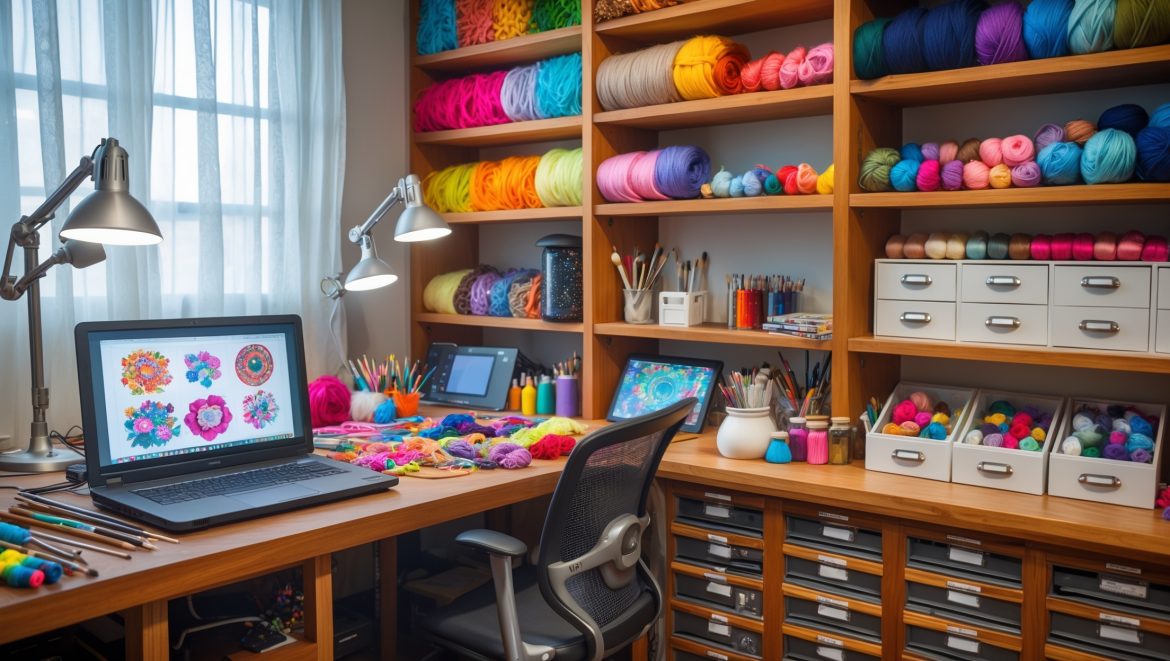
If you’re passionate about DIY, crafts, and creative living, you know that your studio is more than just a workspace—it’s the heart of your creative process. But even the most inspiring spaces can sometimes hinder productivity if they lack the right tools. Fortunately, integrating affordable tech upgrades into your craft studio doesn’t mean breaking the bank or sacrificing your unique style. In fact, a few well-chosen gadgets can streamline your workflow, help you stay organized, and unlock new creative possibilities. Whether you’re a seasoned crafter or setting up your dream studio on a budget, this guide will walk you through practical, cost-effective tech solutions that can make a noticeable difference in your daily projects. From digital planning tools and smart storage to lighting enhancements and app integrations, you’ll discover actionable ideas for transforming your craft studio into a more efficient, inspiring, and enjoyable space. Let’s dive into the world of affordable tech upgrades designed just for creative DIYers like you.
Why Tech Matters in the Modern DIY Craft Studio
Gone are the days when crafting was limited to scissors, glue, and a sturdy table. Today’s creative makers have access to a wealth of technology that can simplify repetitive tasks, improve storage and organization, and even spark new ideas. Embracing affordable tech doesn’t mean replacing traditional hands-on skills—it means augmenting them to save time, reduce frustration, and let your creativity shine.
- Efficiency: Automating or digitizing certain tasks frees up more time for making.
- Organization: Tech-based storage and planning tools can declutter your workspace.
- Inspiration: Access to digital resources and design tools can expand your creative horizons.
- Safety & Comfort: Smart lighting and environment controls make your studio both safer and more comfortable.
Affordable Tech Upgrades: What to Prioritize
1. Digital Project Planning & Inventory Management
Keeping track of ongoing projects, supply levels, and inspirational ideas can quickly become overwhelming. Enter digital project planning tools—many of which are free or low-cost—that help you stay on top of everything.
- Project Management Apps: Tools like Trello, Notion, or Asana can be tailored for craft project tracking. Create boards for each project, set deadlines, and attach reference images.
- Inventory Tracking: Use spreadsheet apps (Google Sheets, Excel) or specialized inventory apps to keep tabs on your supplies. Label storage bins with QR codes linked to digital inventories for instant updates via your phone.
- Idea Repositories: Apps like Evernote or Google Keep let you save sketches, material lists, and inspiration wherever you are.
Budget Tip: Most of these tools have robust free versions. Start simple and expand as your needs grow.
2. Smart Lighting Solutions
Lighting is crucial for any craft space, impacting both the quality of your work and your comfort. Smart lighting offers flexibility and control that traditional lamps can’t match.
- Smart Bulbs: Affordable options like Philips Wiz or Wyze Bulbs allow you to adjust brightness and color temperature via smartphone or voice assistant.
- LED Light Strips: Add color-changing strips under shelves or around workstations for flexible, shadow-free illumination.
- Motion Sensors: Install motion-activated switches to save energy and ensure you’re never left fumbling for the light switch with glue-covered hands.
Budget Tip: Smart bulbs start at under $10 each and are compatible with most standard fixtures.
3. Labeling and Organization Tech
Efficient organization saves time and reduces frustration. Modern labeling solutions go beyond handwritten tags.
- Bluetooth Label Makers: Compact, battery-powered label makers (like the Brother P-touch Cube) pair with your phone to quickly generate custom labels for bins, drawers, and tools.
- QR Code Labels: Use free online generators to create QR codes that link to supply lists, instructions, or digital patterns. Attach them to storage containers for easy access.
- Barcode Scanners: Inexpensive handheld scanners can help track supply usage, especially if you sell finished crafts and need to monitor inventory.
Budget Tip: Entry-level Bluetooth label makers are available for $30–$50; QR code stickers can be printed at home.
4. Digital Cutting and Drawing Tools
While high-end craft machines can be pricey, there are now accessible options for digital cutting and drawing that suit almost any budget.
- Entry-Level Cutting Machines: Devices like the Cricut Joy or Silhouette Portrait 3 start around $150 and can cut paper, vinyl, and more—perfect for card making, decals, and stencils.
- Digital Drawing Tablets: Affordable tablets (Huion, XP-Pen) connect to your computer for hand-drawn designs that can be exported to cutting machines or used in digital scrapbooks.
- Mobile Apps: Free apps like Canva or Autodesk SketchBook allow you to create and print custom designs directly from a tablet or smartphone.
Budget Tip: Look for refurbished or secondhand devices, and start with free design software before investing in premium options.
5. Smart Storage Solutions
Tech-integrated storage systems help you maximize every inch of your workspace and keep supplies at your fingertips.
- App-Controlled Storage Drawers: Modular storage units with Bluetooth locks (such as Lockabox One) keep valuable tools safe and can be opened with your phone.
- Electronic Drawer Trackers: Bluetooth or RFID tags help you locate misplaced items—stick them to frequently used tools or bins.
- Automated Turntables: Motorized lazy Susans or rotating shelves powered by simple Arduino kits make accessing supplies easier in tight spaces.
Budget Tip: DIY your own smart turntable for under $30 using online tutorials and basic electronics kits.
6. Environmental Controls
Comfort and safety are essential for long crafting sessions.
- Smart Plugs: Control heaters, fans, or air purifiers remotely with Wi-Fi plugs. Set schedules to maintain optimal temperature and air quality.
- Bluetooth Thermometers & Hygrometers: Monitor humidity and temperature to protect sensitive materials like paper, wood, or textiles.
- App-Connected Air Purifiers: Entry-level models can track air quality and adjust fan speed automatically, ensuring a healthy workspace.
Budget Tip: Many smart plugs and sensors are available for $10–$25 each.
7. Creative Tech for Inspiration & Collaboration
Technology can connect you to a global community of makers and endless sources of inspiration.
- Wireless Display Screens: Use an inexpensive tablet or monitor to display mood boards, digital instructions, or video tutorials while you work.
- Studio Cameras: Set up a basic webcam or action camera (GoPro alternatives) for time-lapse videos of your process—great for social media or personal archives.
- Collaboration Apps: Platforms like Zoom, Discord, or Slack host virtual craft nights, workshops, or brainstorming sessions.
Budget Tip: Repurpose an old tablet or monitor as a dedicated studio screen for less tech e-waste and lower costs.
How to Choose the Right Tech Upgrades for Your Studio
Assess Your Workflow
Before buying anything, take a week to observe your crafting process. Where do you lose time? What tasks feel repetitive or disorganized? Make a list of pain points and wish-list features.
- Do you spend time searching for misplaced tools?
- Are you frustrated by poor lighting or clutter?
- Do you wish you could digitize your project ideas?
- Is inventory management a headache?
Set a Realistic Budget
Identify your top priorities and allocate funds accordingly. Remember, small upgrades can have a big impact. Consider starting with free software solutions before investing in hardware.
Read Reviews and Tutorials
Online reviews, YouTube walkthroughs, and maker forums are invaluable for learning about the real-world pros and cons of tech tools. Look for solutions that are easy to set up and maintain.
Start Simple, Scale Up
Introduce one or two upgrades at a time. Test how they fit into your workflow before expanding. This approach saves money and ensures each addition truly adds value.
DIY Tech Upgrades: Step-by-Step Mini Projects
Project 1: Creating a QR Code-Enabled Inventory System
- Step 1: Make a supply list in a spreadsheet app.
- Step 2: Use a free online QR code generator to create codes for each item or bin.
- Step 3: Print and attach codes to containers.
- Step 4: Scan codes with your phone to update inventory as supplies are used or refilled.
Project 2: Smart Lighting on a Budget
- Step 1: Select a smart bulb compatible with your existing fixtures.
- Step 2: Download the app and follow setup instructions.
- Step 3: Set up routines for different activities (e.g., bright white for detail work, warm tones for relaxation).
- Step 4: Add motion sensors if desired.
Project 3: DIY Motorized Turntable
- Step 1: Find a basic Arduino or Raspberry Pi motor kit online.
- Step 2: Follow a YouTube tutorial to assemble a rotating platform for paints, glues, or tools.
- Step 3: Customize the platform with dividers or anti-slip mats.
Maintaining and Troubleshooting Tech in Your Craft Studio
Routine Checks
- Update firmware on smart devices regularly to ensure security and compatibility.
- Test batteries in wireless sensors and label makers monthly.
- Back up digital project files to cloud storage or an external drive.
Common Issues and Fixes
- Connectivity Problems: Restart devices and check Wi-Fi signal strength; consider a Wi-Fi range extender if your studio is far from your router.
- Label Printer Jams: Clean the print head and use manufacturer-recommended label paper.
- App Sync Issues: Ensure all devices are running the latest app versions and are signed into the same account.
When to Call in Help
If a device fails repeatedly, check the warranty or reach out to the manufacturer’s support team. For DIY electronics projects, maker forums and online communities are excellent troubleshooting resources.
Future-Proofing Your DIY Craft Studio
Technology evolves quickly, but not every upgrade needs to be cutting-edge. Choose tools with good community support, regular updates, and compatibility with your existing workflow. Whenever possible, opt for modular or open-source solutions that can be adapted as your needs change.
- Keep a wish list of potential upgrades as new needs arise.
- Repurpose or donate old gadgets to reduce e-waste.
- Stay connected with online craft and maker communities for the latest tips and product reviews.
Conclusion
Transforming your DIY craft studio with affordable tech upgrades isn’t about chasing the latest gadgets or sacrificing the hands-on joy of making. It’s about thoughtfully selecting tools that solve real workflow problems, boost organization, and help you make the most of your creative time. From smart lighting that reduces eye strain to digital project planners that keep your ideas organized, the right tech can support your process without overwhelming it. Start with small, impactful changes—like a Bluetooth label maker or a free inventory tracking app—and build up as you discover what truly enhances your studio life. Remember, the goal is a space that inspires and empowers you, not one that adds complexity or clutter. With a little research, creativity, and incremental investment, you can craft a studio that’s as forward-thinking as your imagination. Happy making!
I’d love to know how much of a difference smart lighting makes in your workflow compared to just using brighter bulbs or repositioning lamps. Is it really worth the investment for a small space?
Smart lighting can make a surprisingly big difference, even in small craft studios. Unlike simply adding brighter bulbs or moving lamps, smart lighting lets you easily adjust color temperature and brightness for different tasks, which can reduce eye strain and help with color accuracy. For a small space, even a single smart bulb can create a more comfortable and flexible work environment, so it’s often worth the investment if you work on detailed projects.
You mention smart lighting as a way to make the studio safer and more comfortable. How much of a difference do specific types of lighting make for detailed craft work, and are there budget-friendly brands you recommend?
The type of lighting can make a big difference for detailed craft projects—LED daylight bulbs or adjustable color temperature lights reduce eye strain and help you see colors accurately. For budget-friendly options, brands like TaoTronics and Philips offer adjustable desk lamps and smart bulbs that fit most craft studios without breaking the bank.
When integrating tech for organization, how do you balance physical storage solutions with digital inventory management? Any tips for maintaining both without overlap?
To balance physical storage with digital inventory management, start by assigning a unique label or number to each physical storage bin or drawer. In your digital inventory, reference these labels, recording what’s in each bin. Regularly update the digital inventory when you add or remove supplies to prevent overlap. Keeping both systems synced ensures you always know where everything is, without duplicating efforts.
Can you give some specific examples of digital planning tools that are beginner-friendly and affordable for crafters who are just starting to organize their projects?
Absolutely! Some beginner-friendly and budget-friendly digital planning tools for crafters include Trello for easy project boards, Google Keep for simple lists and reminders, and Microsoft OneNote for organizing notes and sketches. These options all offer free versions and are intuitive to use, making them great for getting started with project organization.
I’m worried about the initial investment for tech upgrades. What would you prioritize first if you were updating a home craft studio with a limited budget?
With a limited budget, I’d prioritize a good LED desk lamp for proper lighting and an affordable Bluetooth label printer to streamline organizing craft supplies. These upgrades are cost-effective, make a noticeable difference in workflow, and can help you get the most out of your existing setup before moving on to bigger investments.
You mention lighting enhancements for comfort and safety. Can you recommend specific types of smart lighting that work well for detailed handcrafts, and are there setup tips to avoid eye strain during long sessions?
For detailed handcrafts, adjustable LED desk lamps with high CRI (Color Rendering Index) are excellent, since they provide clear, true-to-life lighting. Smart bulbs that let you change color temperature between cool and warm are also useful. To avoid eye strain, arrange lighting so it reduces shadows and glare, keep your workspace evenly lit, and take regular breaks to rest your eyes.
When integrating app integrations into your workflow, did you run into any compatibility issues between devices or platforms? Any tips for troubleshooting setup problems for beginners?
Some app integrations can have compatibility issues, especially if your devices use different operating systems like Windows and macOS or iOS and Android. Make sure your apps are updated and check for cross-platform support before installing. If you run into issues, restarting devices, reinstalling apps, and checking permission settings often solves common problems. For beginners, following official setup guides step by step can really help.
Can you suggest affordable digital planning tools that work well for people who prefer physical planners but want to incorporate more tech into their workflow?
If you like the feel of physical planners but want to add some tech, try using a smart reusable notebook like Rocketbook, which lets you write by hand and then digitize your notes. Or, consider digital pen systems like the Moleskine Smart Writing Set. For apps, GoodNotes and Notability pair well with tablets, offering handwriting features that closely mimic paper planners.